
Why do my photos come out sideways?
A photo looks perfectly upright on your phone. You send it to your laptop, or upload it somewhere, and it is lying on its side. Nothing you did changed it, and rotating it in one program does not seem to fix it in another.
The cause is a single number stored inside the file, and once you know it is there the whole thing makes sense.
Your camera does not rotate the picture
When you hold a phone vertically and take a photo, the sensor still captures a landscape rectangle. It always does — the sensor is physically fixed in the body and cannot turn.
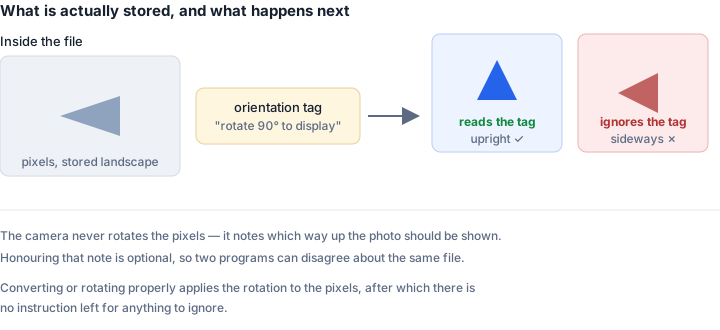
Rather than rotating those pixels, which would take time and, for JPG, would mean re-compressing and slightly degrading the image, the camera writes a note. Inside the file, in a metadata block called EXIF, it stores an orientationvalue: effectively "this was taken rotated 90 degrees clockwise, please display it accordingly."
So the pixels are landscape, and a tag says "show this as portrait." Software that reads the tag shows it correctly. Software that ignores the tag shows you the pixels as stored — on their side.
Why some programs get it right and others do not
The orientation tag has been part of the EXIF standard for decades, but honouring it is a choice each piece of software makes independently.
Phone galleries and modern browsers read it. Some older desktop viewers, various upload forms, some print services and a good deal of image-processing code written in a hurry do not. The tag is optional to respect, easy to overlook, and invisible until someone notices a sideways photograph.
This is also why the problem seems to move around. The same file genuinely looks different in different programs, because they disagree about whether to obey the instruction.
Why rotating it sometimes does not stick
Here is where it gets properly annoying. Some programs "rotate" a photo bychanging the orientation tag rather than the pixels. The image looks right in that program and in anything else that reads the tag — and remains sideways in everything that does not.
Worse, if you rotate a photo whose tag was already being ignored, you can end up double-rotating it: correct in tag-aware software, now upside down in the rest.
So "I already rotated it" and "it is still sideways" are entirely compatible statements, and neither person in that conversation is wrong.
The permanent fix
Bake the rotation into the pixels themselves and clear the tag. Then there is no instruction left to ignore, and every piece of software on earth agrees about which way is up.
That is what happens when a photo is properly converted or rotated: the image is decoded, the orientation is applied for real, and the result is written out with the pixels in the correct arrangement. A 4080 × 3060 photo tagged "rotate 90" becomes a genuine 3060 × 4080 portrait image.
A useful way to confirm it worked: check the dimensions. If the file was landscape before and reports portrait dimensions afterwards, the pixels really moved. If the dimensions are unchanged, only the tag was edited and the problem will follow you.
How to tell what you are dealing with
Open the photo in two different programs — say, your browser and an older desktop viewer. If they disagree about orientation, an EXIF tag is being honoured by one and ignored by the other. If both show it sideways, the pixels themselves are sideways and there is no tag to argue about.
The second case is simpler: just rotate it. The first case is the one that needs the rotation baked in.
Why this matters beyond looking silly
Sideways photos are usually cosmetic, but not always. Upload forms that check image dimensions may reject a portrait photo that reports itself as landscape. Automated document processing can fail on a rotated scan. Print services occasionally produce a landscape print of a portrait photo, with the subject's head cropped off.
Any of those is more irritating than the original problem, and all of them go away once the rotation is real rather than advisory.
A note on what good tools do
Any converter worth using reads the orientation tag before doing anything else, so the image it works with is already the right way up. It sounds obvious; a surprising number of tools skip it, which is why people sometimes convert a photo and find it has mysteriously fallen over.
If a conversion ever turns an upright photo sideways, that is what happened — the tool read the pixels and ignored the note attached to them.
The short version
Your camera stores photos landscape with a tag saying which way up they should be. Some software reads the tag, some does not, and rotating a photo often just edits the tag rather than the image. Converting or rotating the file properly applies the rotation to the actual pixels, after which everything agrees.
PDFs have their own version of exactly this problem, for exactly the same reason: the rotation is an instruction stored beside the content rather than part of it. If a document opens the wrong way up, or looks right for you and wrong for whoever you sent it to, see why is my PDF upside down.
Fix it
- Rotate Image — applies rotation to the pixels, batch supported
- JPG to PNG — conversion bakes in the correct orientation
- HEIC to JPG — the most common source of this problem