
Are online file converters safe?
You have a file that is the wrong format, you search for a converter, and within thirty seconds you have dragged it onto a website you had never heard of a minute earlier. Most of us have done this. Very few of us have stopped to ask what actually happens to the file afterwards.
The short answer: with most converters, your file is uploaded to a server, sits there for some period of time, and is deleted according to a policy you did not read and cannot verify. Usually that is fine. Occasionally it is not. This guide explains the difference, so you can tell which situation you are in.
What actually happens when you upload
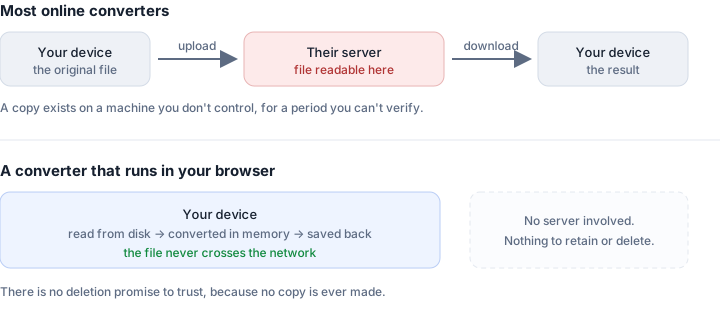
A traditional online converter is three steps. Your browser sends the whole file over the internet to the company's server. Software on that server does the conversion. The result is written to a temporary location and you are given a link to download it.
That middle step is the part worth thinking about. For the conversion to happen, the file has to exist in readable form on a machine you do not control. Not encrypted in a way only you can open — actually readable, because the software has to decode it to convert it. For that window, your document is sitting on someone else's disk.
The download link is a second consideration. On many services it is a plain URL with no authentication. Anyone who has the link can fetch the file until it expires, and those links are sometimes short enough to guess.
What the privacy policies actually say
Most converter sites promise deletion, and the typical wording is some version of "files are automatically deleted after one hour." That is probably true. It is also less reassuring than it sounds, for three reasons.
An hour is a long time. If the server is compromised, or a backup runs, or a misconfigured storage bucket is indexed, an hour is more than enough. Data breaches are rarely discovered while they are happening.
Deletion is not always deletion. Removing a file from a filesystem does not necessarily remove it from backups, from a caching layer, or from a CDN that served the download. Well-run services handle this. You have no way to know whether a particular one does.
You cannot verify any of it. This is the fundamental problem. The promise is unfalsifiable from the outside. You are not evaluating a security property, you are evaluating a company's reputation and hoping it is deserved.
The risks in proportion
It is worth being fair here: most online converters are run by ordinary businesses that have no interest in your holiday photos, and the overwhelming majority of conversions cause nobody any harm. Treating every converter as a threat would be paranoid.
The risk is not that someone is reading your files. It is that a copy of your document exists somewhere you did not intend, and that copy is subject to circumstances outside your control — a breach, an acquisition, a change of policy, a subpoena, an employee with more database access than they need.
Which means the question is not "is this site trustworthy" but "would a copy of this file somewhere else be a problem". For a screenshot of a meme, no. For a scan of your passport, a signed contract, a bank statement, medical records, or unreleased work, the answer is different — and those are exactly the documents people most often need to convert.
Jurisdiction matters more than people expect
A converter operated in one country may be legally obliged to hand over data to authorities there, regardless of where you live. It may also fall outside the data protection rules you assume apply to you. Many converter sites do not clearly state what company operates them or where, which is itself informative.
If a site has no identifiable operator, no address, and a privacy policy that appears to have been copied from a template, that is not proof of bad intent — but it does tell you there is nobody to hold accountable if something goes wrong.
The alternative: conversions that never upload
Here is the part most people do not realise. For a large class of conversions, uploading is completely unnecessary. Your browser already contains the machinery to decode and re-encode images, and to read and write PDFs — it uses it every time you view a web page.
A converter built on those browser APIs reads the file from your disk into memory, converts it there, and writes the result straight back to your downloads folder. The file never crosses the network. There is no server copy to retain, no deletion policy to trust, and no privacy promise to verify, because the situation that would require one never arises.
This is not a marketing distinction, it is an architectural one. The question is not whether a site promises to delete your file. It is whether the site is ever in a position to have it.
How to tell which kind you are using
Three checks, roughly in order of how quickly you can do them.
Watch for a progress bar that says "uploading". The most obvious tell. Local conversion has no upload step, so a large file is ready almost immediately rather than after a wait proportional to your connection speed.
Try it offline. Load the page, disconnect from the internet, then convert a file. A tool that works entirely in your browser will carry on working. One that needs a server will fail immediately. This is the most conclusive test available to a non-technical user, and it takes about fifteen seconds.
Open the network tab. If you are comfortable with browser developer tools, press F12, open Network, and convert a file. You will see either a large request carrying your file to a server, or you will not.
When uploading is genuinely unavoidable
Being honest about the limits: some conversions cannot realistically be done in a browser. Converting a Word document to PDF with correct formatting requires a full document layout engine. OCR on scanned pages requires substantial models. Video transcoding of large files is possible in the browser but often impractically slow.
For those, a server is a legitimate technical requirement rather than laziness. If you have to use one, prefer a company with a real name and address, check whether the file is genuinely sensitive, and consider whether you could redact or crop it first.
The short version
Most online converters upload your file, and most of the time nothing bad comes of it. But the promise that your file was deleted is one you cannot check, and for documents that actually matter that is a poor foundation.
Where a browser can do the job — images, and a good deal of PDF work — a tool that never uploads removes the question entirely. That is worth preferring not because every server is dangerous, but because not needing to trust one is strictly better than trusting one and being right.
Every tool on this site runs entirely in your browser. You can verify that with the offline test above: load a page, disconnect, and convert something. It will still work.
Related tools
- HEIC to JPG — iPhone photos, converted on your device
- Merge PDF — combine documents without uploading them
- Compress Image — shrink photos to a target size locally