
MP4 vs MOV vs MKV
Three file extensions, three sets of compatibility problems — and very often exactly the same video inside all of them. That last part surprises people, and it explains almost everything else: why one conversion finishes in two seconds and another grinds for ten minutes, and why a file that plays perfectly on one device is rejected outright by another.
The distinction that explains everything
MP4, MOV and MKV are containers. They are not video formats. A container is a wrapper that holds separate streams — the picture, the sound, sometimes subtitles and chapters — and describes how they line up in time.
The actual video is stored in a codec: H.264, HEVC, VP9, AV1. The audio likewise: AAC, MP3, Opus, AC-3. The codec determines what the video looks like and how big it is. The container just holds it.
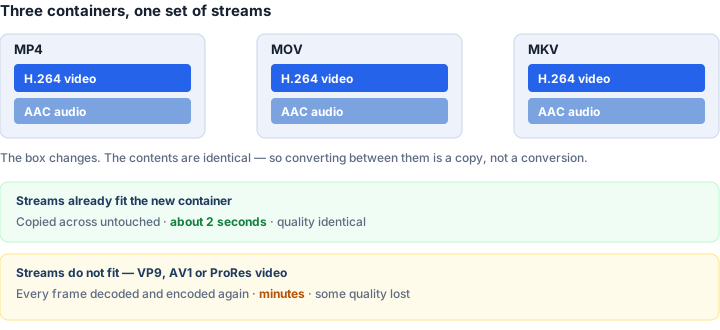
So "converting MOV to MP4" is usually not converting the video at all. It is taking the streams out of one box and putting them in another. Nothing is decoded, nothing is re-compressed, and the result is bit-for-bit identical in quality. The industry term isremuxing, and it is whyMOV to MP4 can finish almost instantly on a file that would take ten minutes to genuinely re-encode.
MP4 — the one that plays everywhere
MP4 is the closest thing video has to a universal format. Every phone, television, browser, console, editor and upload form accepts it. If you only remember one thing: when something needs to work anywhere, it should be an MP4.
That reach comes from being restrictive. MP4 defines a fairly narrow set of codecs it will hold — H.264, HEVC and AAC among them — which is exactly why players can rely on it. A format that accepts anything is a format nothing can guarantee it will play.
MOV — Apple's version, and MP4's parent
MOV is Apple's QuickTime container, and MP4 was derived from it in the late 1990s. They are close relatives, which is why the conversion between them is so straightforward: an iPhone recording is typically H.264 or HEVC video with AAC audio, and all of those are perfectly valid in an MP4.
The reason to convert is compatibility, not quality. MOV plays flawlessly on Apple devices and unevenly elsewhere — Windows software, older Android phones, many TVs and a great many upload forms want MP4 specifically.
MOV is also more permissive than MP4, and that is where the fast path occasionally fails. Professional cameras and some screen recorders write ProRes video or uncompressed audio into a MOV, neither of which belongs in an MP4. Those files have to be genuinely re-encoded.
MKV — the one that holds anything
Matroska is an open container built for flexibility. One MKV can carry several video tracks, a dozen audio languages, multiple subtitle tracks, chapter markers and font attachments. For archiving a film with everything intact, nothing else comes close.
That flexibility is precisely why hardware refuses it. A television cannot promise to play a container that might contain anything, so most simply do not try. MKV is common in downloads and rare in consumer devices.
Converting MKV to MP4 is usually a remux, because the video inside is usually H.264 or HEVC. Two things to expect, though:
- Subtitles often do not survive. MKV commonly stores them in formats MP4 does not accept.
- Extra audio tracks may be dropped. MP4 handles multiple language tracks far less gracefully.
If those matter, keep the MKV as well. The MP4 is for playing on a device that will not read Matroska, not a replacement for the original.
WebM, briefly
WebM is a stripped-down subset of Matroska intended for the web, holding VP8, VP9 or AV1 video with Vorbis or Opus audio. It is well supported in browsers and poorly supported everywhere else.
Converting WebM to MP4 almost always requires real re-encoding, because VP9 and AV1 are not standard in an MP4. This is the one conversion in this group that is genuinely slow, and it is a codec problem rather than a container one.
How to tell which kind of conversion you are about to do
The extension does not tell you — the codec does. As a rough guide:
Almost certainly a fast copy: phone recordings, MOV from an iPhone, most MKV downloads, anything already playing on a TV.
Almost certainly a slow re-encode: WebM from a browser download, AV1 or VP9 files, ProRes from a professional camera.
Rather than have you work this out, our video tools simply try the copy first. If the streams fit, you get the fast path automatically; if they do not, ffmpeg refuses and the tool falls back to re-encoding. The finished file says which happened, so it is never a guess.
Which should you keep?
MP4 for anything that needs to be watched, sent or uploaded.MKV for archiving something with subtitles and multiple audio tracks you care about. MOV mainly if you work in Apple software and it is already what you have.
Because a remux is lossless and quick, there is little cost to keeping an archival MKV and generating an MP4 whenever a device demands one. You are not degrading anything by converting — as long as the fast path is the one that runs.